Choosing the wrong website architecture can cost you in performance, SEO rankings, security, and long-term maintenance. This guide breaks down everything you need to know clearly and practically.
Introduction
When building a website, one of the most important decisions you'll make is whether to go static or dynamic. This choice affects how fast your site loads, how it ranks on Google, how much it costs to run, and how easy it is to maintain.
The right choice isn't about which type is "better" it's about which one fits your business needs. A portfolio site has completely different requirements than an eCommerce store or a SaaS platform.
This guide explains both approaches in plain language, compares them side by side, and helps you make a confident, informed decision.
What Is a Static Website?
A static website is made up of pre-built HTML, CSS, and JavaScript files. When someone visits a static site, the server simply delivers these pre-rendered files directly to the browser, no database queries, no server-side processing.
Key Characteristics of Static Websites
Pages are pre-built and stored as fixed files
Content is the same for every visitor
Served directly via a CDN (Content Delivery Network)
Small business informational sites - "about us," contact, services
Event websites - conference or wedding pages
Popular Static Site Generators
Next.js (static export mode)
Gatsby
Hugo
Jekyll
Eleventy
Static websites are typically hosted on platforms like Netlify, Vercel, GitHub Pages, or AWS S3 often for free or at very low cost.
What Is a Dynamic Website?
A dynamic website generates content in real time. When someone visits a dynamic site, the server processes a request, queries a database, and assembles an HTML page before sending it to the browser.
Key Characteristics of Dynamic Websites
Content is generated on demand per user or per request
Connected to a database (MySQL, PostgreSQL, MongoDB, etc.)
Booking systems - hotel, appointment, or restaurant reservations
News portals - frequently updated articles
Membership or subscription sites
Popular Dynamic CMS Platforms
WordPress (powers 43.5% of all websites)
Drupal
Magento / WooCommerce
Django CMS
Strapi (headless)
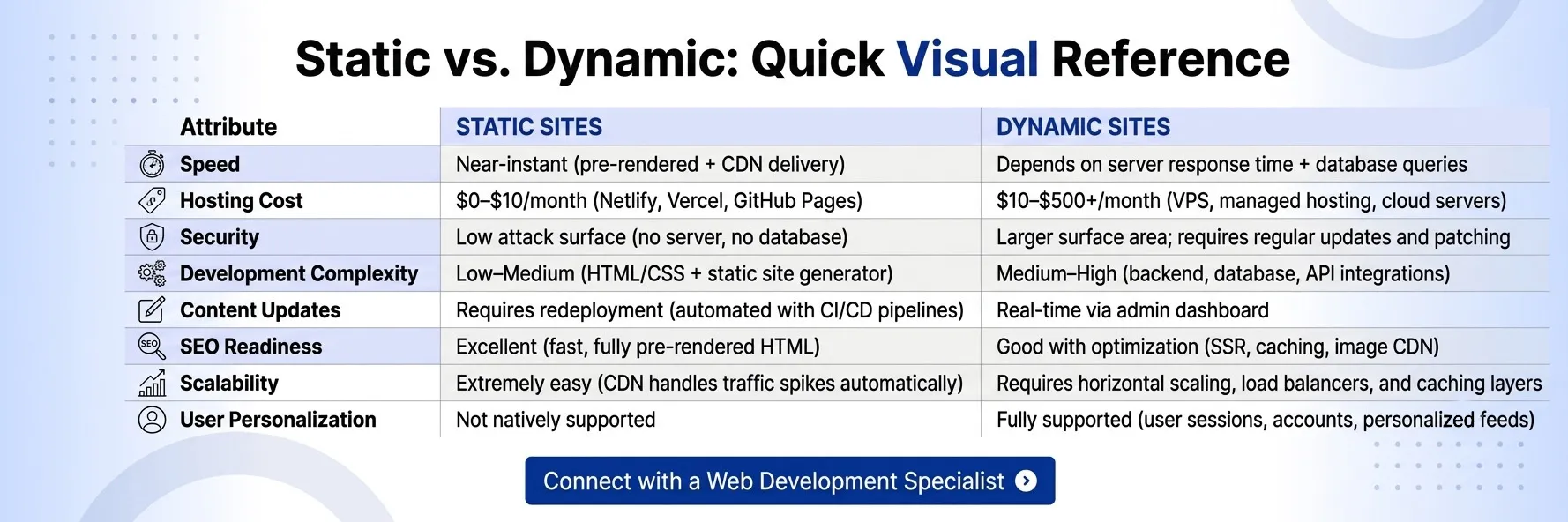
Key Differences Between Static and Dynamic Websites
Feature
Static Website
Dynamic Website
Page Generation
Pre-built at deploy time
Built on request, per user
Speed
Very fast (served via CDN)
Slower (server processing required)
Database
Not required
Required
CMS
Limited (headless CMS possible)
Full CMS support
User Accounts
Not natively supported
Fully supported
Content Updates
Requires redeployment
Real-time, via admin panel
Hosting Cost
Very low or free
Higher (server resources needed)
Security
Lower attack surface
More complex, higher risk surface
Scalability
Easily scalable via CDN
Requires server scaling strategy
Development Time
Faster for simple sites
Longer for complex features
SEO
Excellent (fast, crawlable)
Good (with proper optimization)
Maintenance
Minimal
Ongoing updates required
Static vs Dynamic Website Comparison Table
Criteria
Static
Dynamic
Load Speed
Fastest
Variable
Hosting Cost
$0–$10/month
$10–$500+/month
Setup Complexity
Simple
Moderate–Complex
Content Flexibility
Limited
High
Personalization
Not native
Full
Security Risk
Lower
Higher
Core Web Vitals
Typically excellent
Depends on optimization
Best For
Informational, marketing, docs
eCommerce, SaaS, portals
Real-World Examples
Static Website Examples
Stripe's Marketing Pages Stripe's public-facing marketing and documentation pages are statically generated. This gives them lightning-fast load times and a smooth user experience despite being a complex fintech company. Their product dashboard (account management) is separate and dynamic.
Apple's Product Landing Pages Apple uses static or near-static architectures for many product showcase pages. Speed and presentation quality are prioritized, with no need for user-specific content.
GitHub Pages / Documentation Sites Major open-source projects like React, Vue, and Tailwind CSS publish their documentation as static sites using tools like VitePress or Docusaurus. The content rarely changes and is consumed by millions of developers.
Why it works: These sites don't need real-time data or user accounts. Static delivery via CDN means global visitors get instant load times.
Dynamic Website Examples
Amazon Amazon is a prime example of dynamic architecture at scale. Every product page, recommendation, cart, order status, and personalized feed is generated dynamically based on user data, browsing history, and inventory.
Airbnb Airbnb's listing search, booking flow, user profiles, host dashboards, and real-time availability calendars all require dynamic content.
WordPress-Powered News Sites News portals like TechCrunch and many regional news outlets use WordPress, a dynamic CMS that lets journalists publish stories without touching code.
SaaS Dashboards (e.g., Notion, Trello) Every user sees a different dashboard. Content is personalized, synced in real time, and stored in a database classic dynamic architecture.
Why it works: These platforms couldn't exist as static sites. The entire value proposition is real-time data, personalization, and user interaction.
Google uses Core Web Vitals Largest Contentful Paint (LCP), Cumulative Layout Shift (CLS), and Interaction to Next Paint (INP) as ranking signals. (Source: Google Search Central)
Static websites have a natural advantage here:
Pages are pre-rendered, so there's no server processing delay
CDN delivery reduces latency globally
Smaller payloads mean faster LCP scores
Dynamic websites can match static performance with proper optimization server-side caching, edge delivery, and image optimization but it requires more effort.
According to web.dev, faster pages lead to lower bounce rates, higher engagement, and better conversion rates.
Both static and dynamic websites can be crawled by Google. However:
Static sites serve fully rendered HTML Googlebot can read them immediately
Dynamic sites that rely on JavaScript rendering may require Google to execute JS before content is indexed
If your dynamic site relies heavily on client-side rendering without server-side rendering (SSR) or pre-rendering, you risk delays in indexing.
Mobile Performance
Static sites served via CDN load fast on mobile connections. Dynamic sites with heavy server queries and unoptimized assets can be sluggish on 3G/4G networks.
As AI-powered search (Google AI Overviews, Perplexity, ChatGPT Search) becomes more prominent, content clarity and structure matter more than ever. Static sites with clean, well-structured HTML tend to be more parseable by AI systems.
Well-structured semantic HTML proper heading hierarchy, clear paragraphs, schema markup helps both traditional and AI-powered search engines understand and surface your content.
When to Choose a Static Website
Choose a static website when:
You're a freelancer, agency, or small business with an informational site
Your content doesn't change frequently - services, portfolio, about page
You need maximum speed - landing pages, product marketing sites
Budget is a constraint - static hosting is near-free
You're building a documentation site or open-source project hub
Security is a priority - fewer moving parts means fewer attack vectors
You want simple maintenance - no CMS to update, no plugins to patch
You're running an SEO-focused content site with pre-rendered blog posts
Practical Checklist
Ask yourself: Does this site need user login, database queries, or real-time content? If the answer to all three is no, a static website is probably the right choice.
The lines between static and dynamic websites have blurred significantly. Modern frameworks let you mix both approaches intelligently.
Jamstack Architecture
Jamstack (JavaScript, APIs, Markup) is a modern approach where:
The frontend is statically generated at build time
Dynamic functionality is handled via APIs and third-party services
The result: static-speed performance with dynamic capabilities
Examples of Jamstack-powered sites include e-commerce storefronts (Shopify + Next.js), marketing sites with form integrations, and blogs with dynamic comments.
A headless CMS separates content management from content delivery. Content editors work in a familiar dashboard (like Contentful, Sanity, or Strapi), and the frontend consumes content via API either statically at build time or dynamically at request time.
This gives you the editing experience of a dynamic CMS with the performance of a static site.
Next.js is a React framework that supports multiple rendering modes in a single project:
Static Site Generation (SSG) - pages pre-built at build time
Server-Side Rendering (SSR) - pages generated on each request
Incremental Static Regeneration (ISR) - static pages refreshed in the background
This means a single Next.js app can serve a static homepage, a dynamically rendered product page, and a server-rendered dashboard all with optimal performance.
How WRTeam Helps Businesses Choose the Right Architecture
Choosing between static and dynamic isn't always a clear-cut decision especially when your business is growing or your requirements are evolving.
At WRTeam, we build websites and web applications with the architecture that actually fits your goals, not just whatever is easiest or fastest to ship.
Whether you need:
A blazing-fast static marketing site that ranks well on Google
A scalable dynamic platform with user accounts and real-time data
A hybrid Jamstack architecture that gives you the best of both worlds
A headless CMS setup so your team can update content without a developer
...we design for performance, SEO, security, and long-term maintainability.
Our team has experience with custom web development, Flutter app development, UI/UX design, and ready-made source code solutions so you get a complete, scalable solution rather than a patchwork of disconnected tools.
The static vs dynamic debate doesn't have a universal winner. The right choice depends on what your website needs to do.
Choose static when you need speed, simplicity, low cost, and your content doesn't change in real time.
Choose dynamic when you need user accounts, real-time data, personalization, or a full CMS for a team of content editors.
Choose hybrid (Jamstack) when you want static-level performance with the flexibility of a dynamic backend increasingly the best of both worlds for modern businesses.
The most important thing is to make this decision intentionally, based on your actual requirements not based on what someone else is using or what happens to be popular.
If you're unsure which architecture is right for your project, WRTeam's web development team can assess your requirements and recommend the right approach whether that's a custom-built static site, a high-performance dynamic platform, or a modern hybrid architecture built for scale.