
If you've been searching for a clear, no-fluff guide on how to build a Flutter app, you've landed in the right place.
Whether you're a developer taking your first steps, a startup founder planning your MVP, or a business evaluating cross-platform development, this guide walks you through everything from setting up your environment to deploying your app on the Play Store and App Store.
Let's get into it.
What is Flutter?
Flutter is an open-source UI framework created by Google that lets you build beautiful, natively compiled apps for mobile (iOS & Android), web, desktop, and embedded systems all from a single codebase.
Instead of writing separate code for iOS and Android, Flutter uses the Dart programming language and its own rendering engine (Skia/Impeller) to deliver pixel-perfect UI on every platform.
Key fact: Flutter was first released in 2017 and hit its stable 1.0 release in December 2018. As of 2025, it has over 170,000+ stars on GitHub, making it one of the most starred repositories in the world. (GitHub, 2025)
Why Flutter is So Popular in 2026
The flutter didn't just grow, it exploded. Here's why developers and businesses love it:
-
Single codebase, multiple platforms - Write once, deploy everywhere.
-
Fast development with Hot Reload - See changes instantly without restarting your app.
-
Beautiful, customizable UI - Flutter's widget system gives you complete control over design.
-
Near-native performance - Flutter compiles to native ARM code, so performance is excellent.
-
Strong Google backing - Regular updates, a growing ecosystem, and long-term support.
-
Large community - Over 3 million Flutter developers worldwide as of 2024. (Google I/O, 2024)
According to the Stack Overflow Developer Survey 2024, Flutter ranks among the top 10 most-used frameworks, with strong satisfaction rates among professional developers. (Stack Overflow Survey, 2024)
The global mobile app market was valued at over $228 billion in 2023 and is projected to reach $756 billion by 2027. Flutter positions businesses to capture this growth efficiently.
Benefits of Flutter App Development
Here's a quick summary of what Flutter brings to the table:
|
Benefit |
Impact |
|---|---|
|
Single codebase |
~50% reduction in development cost |
|
Hot Reload |
2–3x faster UI iteration |
|
Cross-platform |
iOS + Android from one project |
|
Rich widget library |
Faster UI development |
|
Strong performance |
Smooth 60/120fps rendering |
|
Growing packages |
35,000+ packages on pub.dev |
Businesses using Flutter can typically reduce their development budget by 30–40% compared to building separate native apps.
Things You Need Before Building a Flutter App
Before writing a single line of code, make sure you have these essentials ready:
Tools & Setup
-
Flutter SDK - The core framework. Download from flutter.dev
-
Android Studio - Required for Android emulator and SDK management
-
VS Code - Lightweight code editor with excellent Flutter extensions
-
Xcode - Required if you're building for iOS (Mac only)
-
Git - For version control
Knowledge Prerequisites
-
Dart basics - Flutter's programming language. It's beginner-friendly and similar to JavaScript/Java.
-
OOP concepts - Classes, objects, inheritance, and interfaces
-
Basic UI/UX thinking - Understanding of layouts, navigation, and user flows
-
REST API basics - How apps communicate with backends
-
Firebase basics - Google's BaaS platform, widely used with Flutter
Planning Prerequisites
-
A clear app idea - What problem does your app solve?
-
Target audience - Who will use it?
-
Core feature list - What are the must-haves for version 1?
-
Basic wireframes - Rough sketches of your screens
Checkout our complete Flutter app development checklist.
Step-by-Step Flutter App Development Process
Let's walk through the full process from idea to launch.
Step 1: App Idea Validation
Before writing code, validate your idea.
-
Talk to potential users - Survey at least 20–30 people in your target audience
-
Search for competitors - Analyze what's already on the App Store and Play Store
-
Define the core problem - One clear problem your app solves
-
Check market size - Is there a large enough audience?
Skipping this step is the #1 reason app projects fail.
Step 2: Market Research
Study your competition deeply.
-
Download competitor apps and note what's missing
-
Read negative reviews on the Play Store those are your opportunities
-
Research keyword demand using tools like Google Trends or App Annie
-
Identify your unique value proposition (UVP)
Step 3: Feature Planning
Don't build everything at once.
-
Define MVP features - The minimum set needed to solve the core problem
-
Create a feature roadmap - Version 1.0, 1.1, 2.0 etc.
-
Prioritize ruthlessly - If in doubt, leave it out of v1
-
Document every feature - Use Notion, Jira, or even Google Sheets
Step 4: UI/UX Wireframing
Sketch your app before building it.
-
Use Figma (most popular), Adobe XD, or even paper sketches
-
Design every screen your user will see
-
Create user flow diagrams how do users move between screens?
-
Get feedback on your wireframes before development starts
Good UI/UX upfront saves weeks of rework later.
Step 5: Flutter Environment Setup
Now the technical part begins.
-
Download and install the Flutter SDK
-
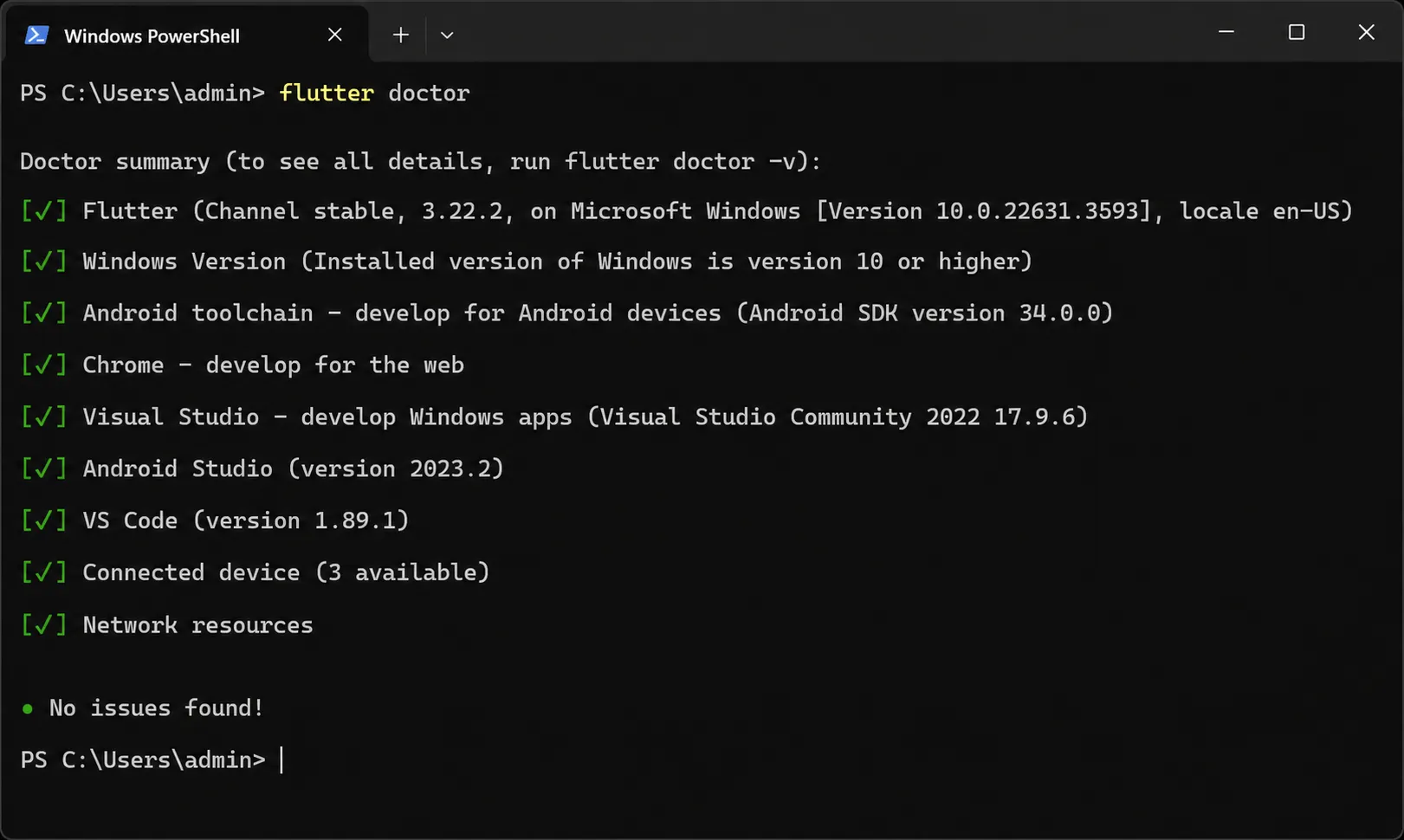
Run flutter doctor in your terminal to check all dependencies
-
Install Android Studio and set up the Android emulator
-
Install the Flutter and Dart plugins in VS Code or Android Studio
-
Create your first project with flutter create my_app
-
Run it on an emulator or physical device
[Screenshot of flutter doctor output showing all green checkmarks]
Step 6: Project Architecture Planning
A well-structured project is easier to scale and maintain.
Popular Flutter architecture patterns:
-
MVC (Model-View-Controller) - Simple, good for small apps
-
MVVM (Model-View-ViewModel) - Popular with Provider or Riverpod
-
Clean Architecture - Best for large, complex apps
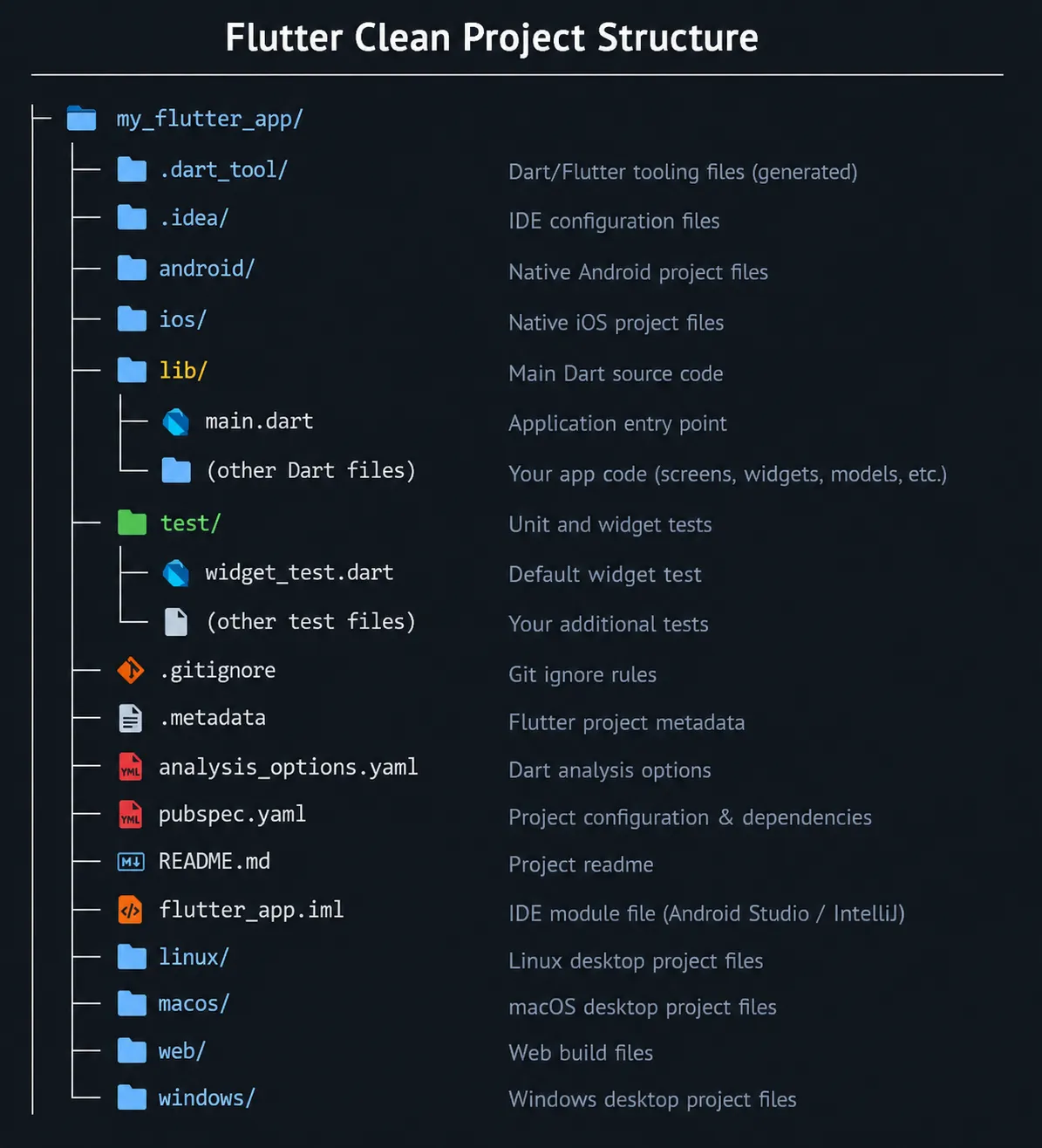
Plan your folder structure early:
lib/
models/
views/
controllers/
services/
widgets/
utils/
[Flutter clean project folder structure diagram]
Step 7: State Management Selection
State management is how your app handles data changes. This is one of the most important architectural decisions.
Most popular options:
|
Solution |
Best For |
Complexity |
|---|---|---|
|
Provider |
Beginners, small apps |
Low |
|
Riverpod |
Mid-size apps |
Medium |
|
Bloc/Cubit |
Large, complex apps |
High |
|
GetX |
Fast prototyping |
Low-Medium |
|
MobX |
Reactive apps |
Medium |
Recommendation: Start with Provider or Riverpod if you're new to Flutter. Use Bloc for enterprise-grade apps.
Step 8: Backend Selection
Your Flutter app needs a backend to store and serve data.
Popular backend options for Flutter:
-
Firebase - Most popular choice. Real-time database, auth, storage, hosting. No backend coding needed.
-
Supabase - Open-source Firebase alternative with PostgreSQL
-
Node.js + Express - Custom REST API backend
-
Laravel (PHP) - Popular for startups in South Asia and Europe
-
Django (Python) - Great for data-heavy apps
-
AWS Amplify - Scalable enterprise backend
For startups and MVPs: Firebase is usually the fastest path to launch.
Step 9: API Integration
Most Flutter apps communicate with a backend via REST APIs.
-
Use the http or dio package for making API calls
-
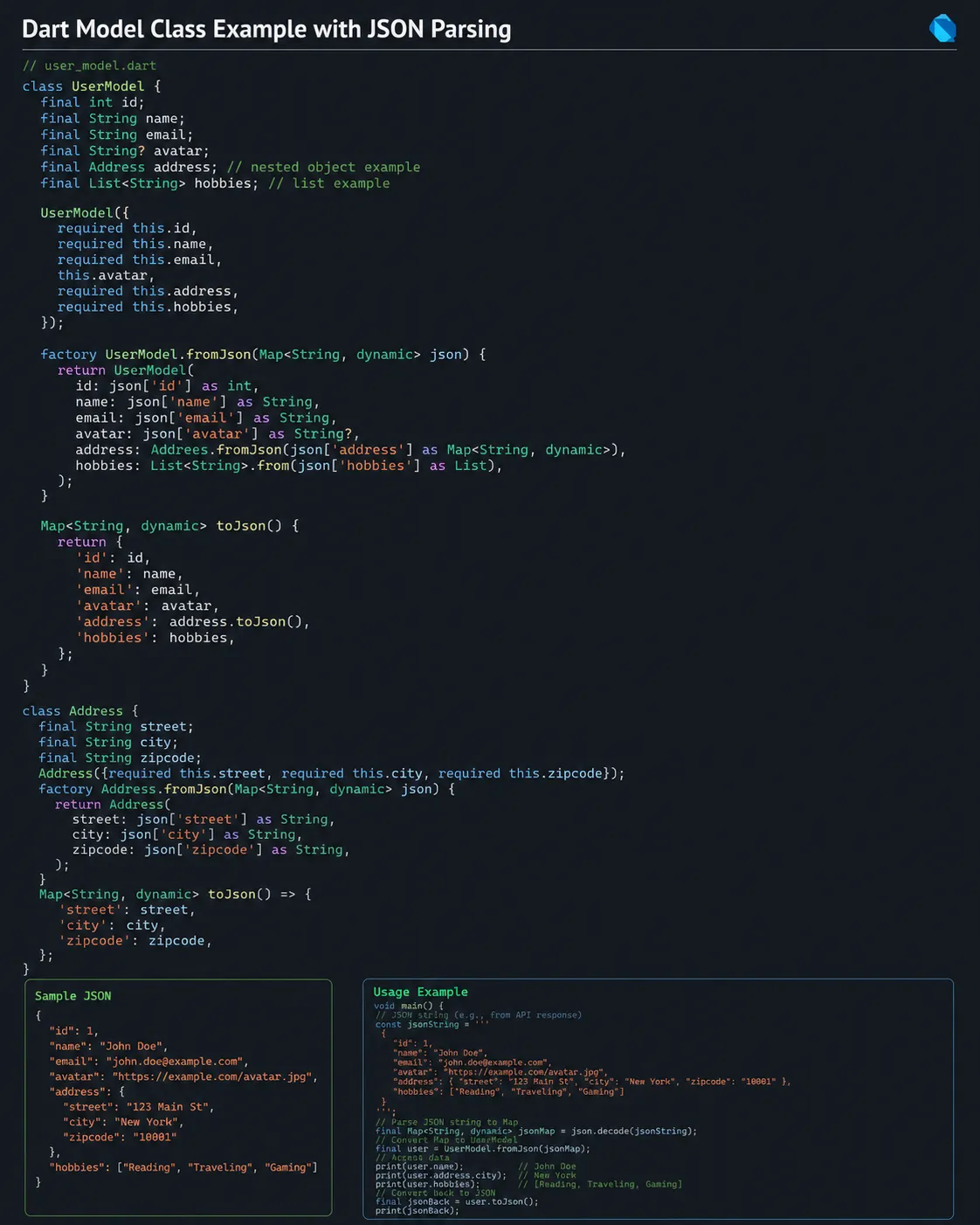
Parse JSON responses into Dart model classes
-
Handle loading states, errors, and empty states properly
-
Use interceptors with dio for auth tokens and logging
[Dart model class example with JSON parsing]
Step 10: Database Setup
Depending on your app, choose the right database layer:
-
Firebase Firestore - NoSQL cloud database, real-time sync
-
Firebase Realtime Database - Simpler real-time sync
-
SQLite (via sqflite package) - Local on-device storage
-
Hive - Fast, lightweight local NoSQL database
-
Isar - Modern, high-performance local database for Flutter
Most apps use a combination: cloud database + local caching.
Step 11: Authentication Implementation
Every app needs login. Flutter + Firebase makes this simple.
-
Email/Password - Classic login
-
Google Sign-In - One-tap login
-
Apple Sign-In - Required for iOS App Store
-
Phone OTP - Common in South Asian and emerging markets
-
Social login - Facebook, Twitter, etc.
Use the firebase_auth package for most of these. Implement proper token refresh and session management from day one.
Step 12: UI Development
Now it's time to build your screens.
Flutter's UI is built entirely with widgets. Everything is a widget button, text, images, layouts, even the app itself.
Two types of widgets:
-
Stateless Widget - Static UI that doesn't change (logo, static text)
-
Stateful Widget - Dynamic UI that reacts to data changes (cart count, user profile)
Key layout widgets to know:
-
Column and Row - Vertical and horizontal layouts
-
Stack - Layered widgets
-
Container - Box model with padding, margin, decoration
-
ListView - Scrollable list
-
GridView - Grid layout
-
Scaffold - The base screen template
Step 13: Responsive Design
Your app must look great on all screen sizes small phones, large phones, and tablets.
-
Use MediaQuery to get screen dimensions
-
Use LayoutBuilder for responsive layouts
-
Use flutter_screenutil package for proportional sizing
-
Test on multiple screen sizes using the Flutter emulator
Step 14: Testing
Testing prevents bugs from reaching your users.
Three types of Flutter tests:
-
Unit tests - Test individual functions and logic
-
Widget tests - Test individual UI components
-
Integration tests - Test full user flows end-to-end
Run tests with flutter test. Aim for at least 70% code coverage on critical features before launch.
Step 15: Performance Optimization
A fast app keeps users happy.
-
Use const constructors wherever possible reduces widget rebuilds
-
Lazy load images with cached_network_image
-
Avoid blocking the main thread with heavy computations use Isolates
-
Use Flutter's DevTools to identify jank and memory issues
-
Optimize images and assets before bundling
Step 16: App Deployment
Google Play Store:
-
Create a keystore for signing
-
Update build.gradle with signing config
-
Run flutter build appbundle
-
Upload the .aab file to Google Play Console
-
Fill in store listing, screenshots, and submit for review
Apple App Store:
-
Enroll in the Apple Developer Program ($99/year)
-
Configure signing in Xcode
-
Run flutter build ipa
-
Upload via Xcode or Transporter
-
Submit through App Store Connect
Step 17: Maintenance & Updates
Your app launch is a beginning, not an end.
-
Monitor crash reports via Firebase Crashlytics
-
Track user behavior with Firebase Analytics
-
Push regular bug fix updates (monthly minimum)
-
Collect user feedback and iterate
-
Keep Flutter and package dependencies updated
Once you're live, here's how to monetize your Flutter app effectively.
Flutter Architecture Explained
Flutter's architecture has three layers:
-
Framework Layer (Dart) - Widgets, animations, gestures, rendering
-
Engine Layer (C++) - Skia/Impeller rendering, Dart runtime, platform channels
-
Embedder Layer - Platform-specific integration for iOS, Android, web, desktop
This architecture is why Flutter is fast. It doesn't use native UI components, it draws everything itself using its own rendering engine.
Flutter vs Other Frameworks
Flutter vs React Native
|
Factor |
Flutter |
React Native |
|---|---|---|
|
Language |
Dart |
JavaScript |
|
Performance |
Near-native |
Good, but bridges can lag |
|
UI Rendering |
Own engine |
Native components |
|
Hot Reload |
Yes |
Yes |
|
Community |
Large, growing |
Large, mature |
|
Google Support |
Yes |
Meta (Facebook) |
|
Best For |
Apps needing consistent UI |
Teams with JS expertise |
Flutter vs Native Development
|
Factor |
Flutter |
Native (iOS + Android) |
|---|---|---|
|
Codebase |
Single |
Two separate codebases |
|
Team Size |
Smaller |
Larger (iOS + Android devs) |
|
Development Cost |
~50% lower |
Baseline |
|
Time to Market |
Faster |
Slower |
|
Performance |
Excellent |
Optimal |
|
Platform Integration |
Good |
Best |
Flutter vs Traditional Development
Find out why Flutter is the smartest framework choice for your first startup app before you pick a stack.
Development Cost Comparison:
-
Native iOS + Android app: $50,000–$150,000+
-
Flutter cross-platform app: $25,000–$80,000
-
Cost saving: 30–50%
Time to Market:
-
Native apps: 6–12 months
-
Flutter app: 3–6 months
-
Time saving: ~40%
Code Reusability:
-
Flutter: Up to 95% code shared between iOS and Android
-
React Native: ~85–90%
-
Xamarin: ~75–90%
Performance Benchmark:
-
Flutter renders at 60fps consistently, achieves 120fps on supported devices
-
Startup time comparable to native apps
Startup Advantages:
-
One developer team instead of two
-
Single codebase = fewer bugs
-
Faster iteration cycles
-
Reduced maintenance overhead
Why Startups Choose Flutter
Flutter is arguably the best framework for startups. Here's why:
-
Fast MVP development - Launch in weeks, not months
-
Lower burn rate - One team for all platforms
-
Easy to pivot - Single codebase is easier to modify
-
Investor-friendly - Live on iOS and Android from day one
-
Large talent pool - More Flutter developers entering the market every year
startups that reduce time-to-market by 50% have a 2x higher chance of capturing market share before competitors.
Flutter directly enables that speed advantage.
Using Ready-Made Flutter Source Codes
Not every business needs to build from scratch. Ready-made Flutter source codes are production-ready app templates you can purchase, customize, and launch in a fraction of the time.
When to use a ready-made source code:
-
You have a standard app type (eCommerce, food delivery, marketplace)
-
Budget is limited and time-to-market matters
-
You want a proven, tested foundation
-
Your team wants to skip boilerplate work
Typical savings: A ready-made Flutter source code can reduce development time by 60–80% and cost by 50–70% compared to building from scratch.

Common Mistakes to Avoid
Even experienced developers make these mistakes. Avoid them:
-
Skipping architecture planning - Spaghetti code is hard to maintain
-
Poor state management - setState() everywhere leads to UI bugs
-
Not handling errors - APIs fail. Always handle network errors gracefully.
-
Ignoring app size - Large assets bloat your APK/IPA
-
No testing before launch - Manual testing only isn't enough
-
Hardcoding API keys - Use environment variables or secure storage
-
Not optimizing images - Use WebP, compress images, lazy load
-
Ignoring accessibility - Add semantic labels and support for screen readers
-
Skipping analytics - You can't improve what you don't measure
-
No CI/CD pipeline - Automate builds, tests, and deployments early
Cost of Building a Flutter App
Flutter app development cost depends on complexity, features, and team location.
|
App Type |
Estimated Cost |
Timeline |
|---|---|---|
|
Simple app (5–8 screens) |
$5,000–$20,000 |
1–3 months |
|
Medium app (10–20 screens) |
$20,000–$60,000 |
3–6 months |
|
Complex app (30+ screens) |
$60,000–$150,000+ |
6–12 months |
|
Ready-made source code |
$200–$2,000 |
Days to weeks |
Cost factors:
-
Number of screens and features
-
Backend complexity
-
Third-party integrations (payments, maps, etc.)
-
Design complexity
-
Developer location and experience
-
Ongoing maintenance
Time Required to Build a Flutter App
|
Phase |
Duration |
|---|---|
|
Idea validation & research |
1–2 weeks |
|
UI/UX design |
2–4 weeks |
|
Development |
4–16 weeks |
|
Testing |
1–3 weeks |
|
Deployment |
1 week |
|
Total (simple app) |
2–4 months |
|
Total (complex app) |
6–12 months |
With ready-made Flutter source codes from WRTeam, you can compress the development phase from months to days or weeks, depending on customization needs.
Checkout our blog on MVP vs Full App: What Startups Should Build First.
How WRTeam Helps Businesses Build Flutter Apps
WRTeam is a Flutter app development company that specializes in building cross-platform mobile apps for startups, enterprises, and agencies.
What WRTeam offers:
-
Custom Flutter App Development - Full-cycle development from design to deployment
-
Ready-Made Flutter Source Codes - Production-ready apps for eCommerce, food delivery, real estate, classifieds, and more
-
White-Label Solutions - Branded apps delivered fast
-
App Customization Services - Modify any ready-made source code to fit your brand
-
Mobile App Maintenance - Ongoing support and updates after launch
WRTeam's ready-made Flutter apps include popular categories like:
-
eCommerce Flutter App - Full-featured shopping app
-
Food Delivery Flutter App - Uber Eats-style delivery platform
-
Classified Ads App - OLX/Craigslist-style marketplace
-
Real Estate App - Property listing and search platform
Whether you're building from scratch or launching fast with a ready-made solution, WRTeam has the expertise to get you to market efficiently.
Not sure whether to hire a Flutter developer or use a ready-made solution? Here's how to decide.
Conclusion
Building a Flutter app in 2026 is more accessible than ever. The framework is mature, the ecosystem is rich, and the business case is clear cross-platform development saves time, money, and complexity.
Whether you're a developer starting your first project, a startup planning your MVP, or a business evaluating Flutter for your next product, the path is straightforward: validate your idea, plan your architecture, build systematically, and launch on both platforms simultaneously.
If you want to move even faster, WRTeam's ready-made Flutter source codes give you a production-ready head start. And if you need a complete custom solution, WRTeam's Flutter app development team is ready to build it with you.
The best time to start building your Flutter app was yesterday. The second best time is now.
Ready to build your Flutter app? Explore WRTeam's Flutter app development services and ready-made source codes to launch faster and smarter.
This article was written by the WRTeam content team. WRTeam is a Flutter app development company specializing in cross-platform mobile apps, ready-made source codes, and white-label solutions for startups and businesses worldwide.
Last updated: 2026 | Sources: Google I/O 2024, Stack Overflow Developer Survey 2024, GitHub Flutter Repository 2025