Most engineering teams that come to us believe their DevOps setup is fundamentally broken. Pipelines keep failing. Deployments take forever. Cloud bills are climbing. Developers are frustrated.
And their first instinct? Tear it all down and start fresh.
That instinct is almost always wrong and expensive.
In most cases, the tools aren't the problem. The infrastructure isn't the problem. The way those tools are configured, maintained, and used is the problem. And that's a far cheaper fix than a complete rebuild.
This guide walks through the most common DevOps inefficiencies, what actually needs fixing, and when optimization beats replacement every single time.
Why Companies Think Their DevOps Is Broken
When teams start hitting operational friction, the symptoms are usually obvious:
-
Deployments that take 40 minutes when they should take 5
-
CI/CD pipelines that fail unpredictably
-
Downtime that can't be traced to a root cause
-
Kubernetes clusters that scale poorly or not at all
-
Monitoring dashboards nobody looks at because alerts are constant noise
-
Developers manually pushing code because the automated pipeline is "unreliable"
-
Release cycles that stretch from weeks to months
Each of these symptoms feels like a broken system. But most of the time, they trace back to implementation problems, not tool problems.
According to the GitLab 2023 DevSecOps Report, 44% of developers cite slow pipelines as their top productivity blocker, not the tools themselves, but how those tools are set up and managed.
The difference matters. A lot.
Common DevOps Problems That Don't Require a Full Rebuild
Before you consider ripping out your current stack, check whether any of these match your situation:
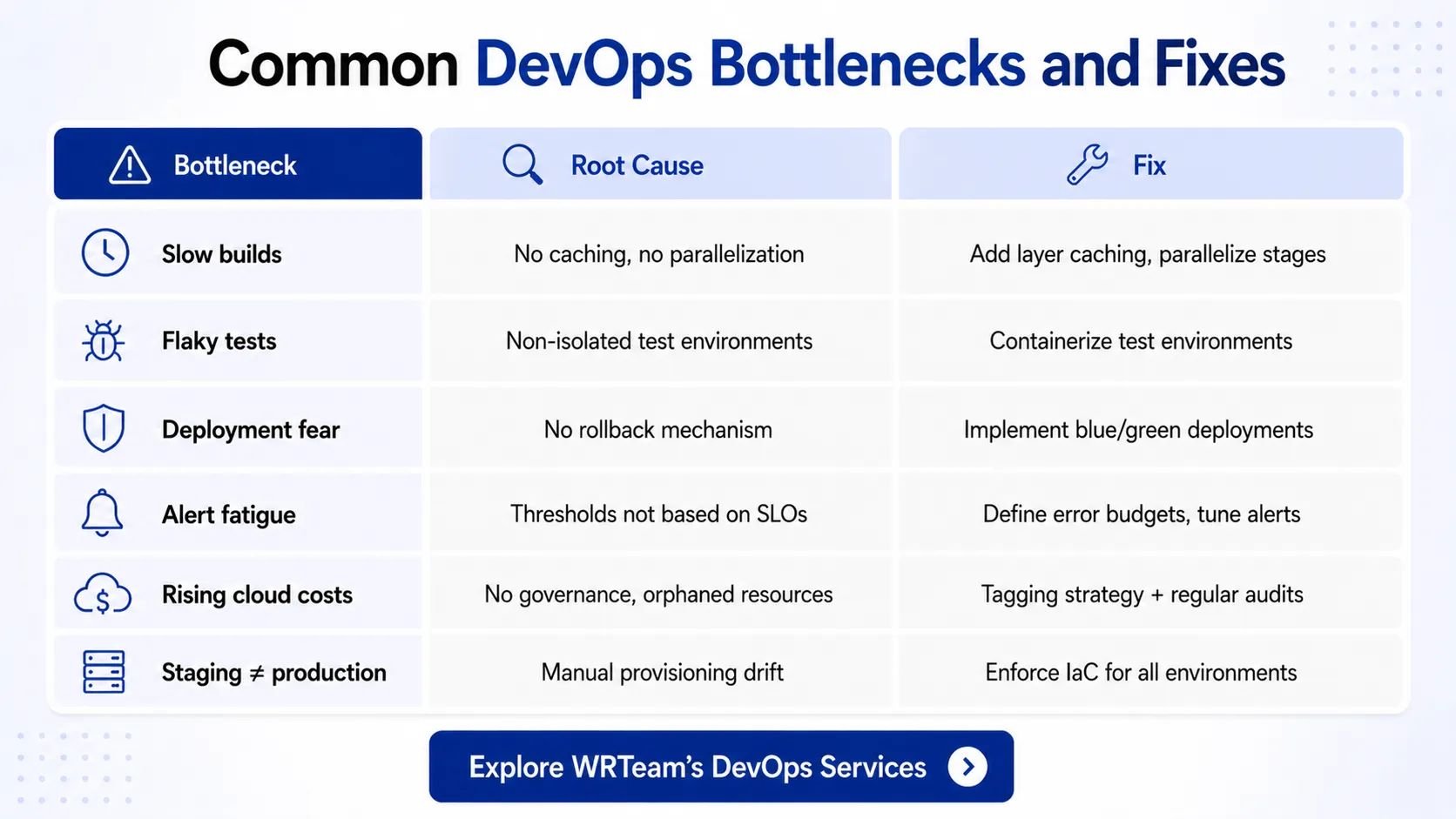
Poorly Structured CI/CD Pipelines
Most CI/CD problems aren't caused by the platform (Jenkins, GitHub Actions, GitLab CI, CircleCI). They're caused by:
-
No pipeline caching, so dependencies reinstall on every run
-
Sequential stages that should run in parallel
-
No separation between test, build, and deploy jobs
-
Pipelines with no failure notifications or rollback triggers
Fixing the pipeline structure, not the platform, typically cuts build times by 40–60%.
See the full breakdown in CI/CD pipeline broken? 7 common causes and how to fix them.
Weak or Missing Observability
According to the CNCF 2023 Observability Report, over 50% of organizations lack complete visibility into their production environments.
The usual pattern: logging exists, but it's unstructured. Metrics exist, but they're not tied to business outcomes. Alerts exist, but they fire for everything so teams ignore them.
This isn't an infrastructure problem. It's a configuration and tooling discipline problem.
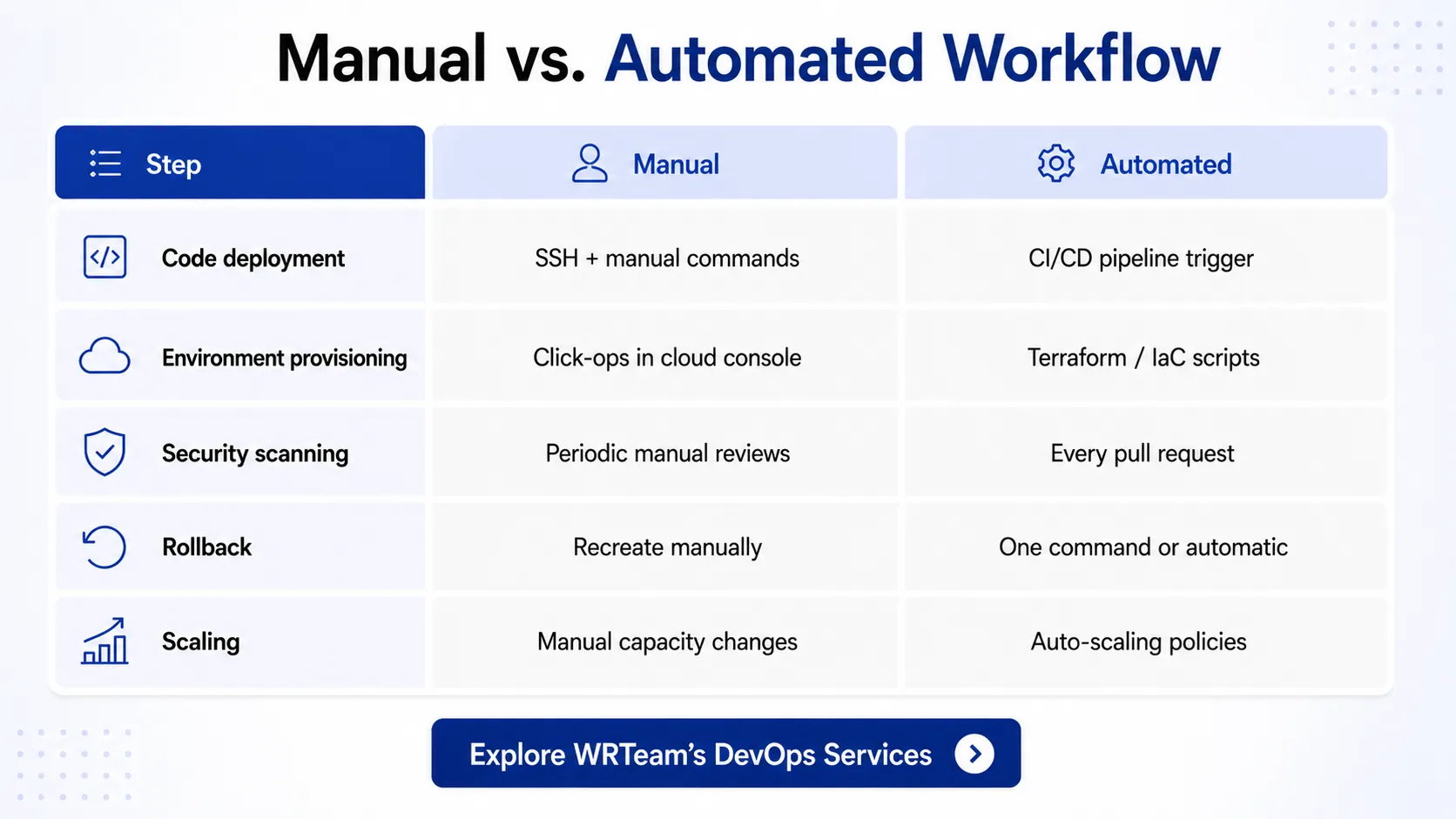
Manual Deployments in Disguise
Automated deployments that still require a human to "click the button" or SSH into a server aren't truly automated. Infrastructure that was provisioned manually without Infrastructure as Code creates invisible drift between environments that causes production bugs that never appear in staging.
Bad Branching Strategies
Teams running long-lived feature branches, no trunk-based development discipline, and inconsistent merge strategies create integration nightmares. This slows delivery, not because CI/CD is broken, but because the workflow feeding it is.
Misconfigured Kubernetes Clusters
Kubernetes documentation makes it clear: resource requests and limits must be set correctly, or clusters will either over-provision or throttle services unpredictably. Most teams deploying on Kubernetes haven't configured these properly and that alone creates scaling instability.
Infrastructure Sprawl
Cloud accounts with orphaned instances, forgotten load balancers, test environments left running, and overlapping security groups. This isn't a cloud problem, it's a governance problem. And it can be solved with a proper audit and cleanup, not a migration.
Read why your AWS or GCP bill is higher than it should be and what to do about it.
What Actually Needs Fixing in Most DevOps Environments
If the above resonates, here's what a practical DevOps optimization engagement typically focuses on:
Pipeline Optimization
-
Add caching for dependencies and Docker layers
-
Parallelize test suites
-
Separate build, test, and deploy stages cleanly
-
Set up automated rollback on failed deployments
-
Enforce quality gates before production merges
Businesses working with experienced DevOps consulting partners can often reduce deployment time from 45+ minutes to under 10 minutes through pipeline restructuring alone.
See how one team cut deployment time from 4 hours to 12 minutes without rebuilding their stack.
Infrastructure Cleanup and Standardization
-
Audit and remove unused resources (AWS, GCP, or Azure)
-
Enforce tagging and cost allocation
-
Migrate manual infrastructure to Terraform or Pulumi
-
Standardize environment parity between dev, staging, and production
Better Observability
-
Implement structured logging with proper log levels
-
Set up meaningful SLOs and SLAs (not just uptime pings)
-
Configure alert thresholds based on actual error budgets
-
Use distributed tracing for complex microservices
Google Cloud's SRE principles recommend defining error budgets before setting alert thresholds this eliminates most alert fatigue immediately.
Deployment Automation
-
Remove manual steps from production deployment workflows
-
Implement feature flags for safer releases
-
Set up blue/green or canary deployments for zero-downtime releases
-
Automate database migration steps in the pipeline
Teams investing in solid cloud deployment infrastructure typically see a measurable reduction in release-related incidents within the first quarter.
Security Hardening
-
Add SAST/DAST tools into the CI/CD pipeline
-
Rotate secrets automatically (not manually)
-
Implement least-privilege IAM roles across cloud environments
-
Enforce network segmentation between services
Cost Optimization
-
Right-size compute instances based on actual utilization
-
Implement auto-scaling policies that actually work
-
Use spot/preemptible instances for non-critical workloads
-
Set up cloud cost anomaly alerts
According to the AWS Cost Optimization Hub, most organizations have 30–35% of cloud spend that can be eliminated without impacting performance.
Read the signs your DevOps setup is costing more than it should before your next billing cycle.
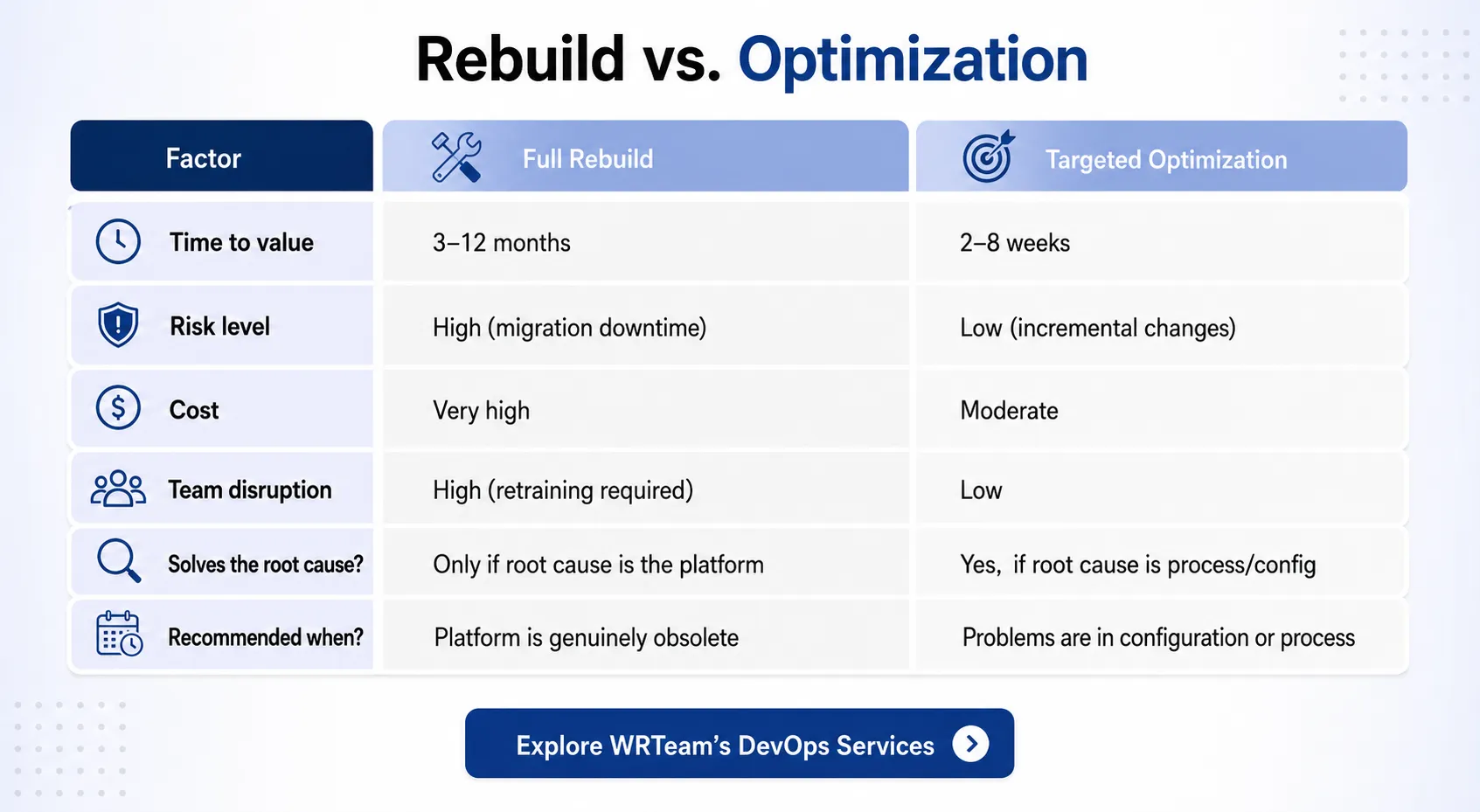
The Hidden Cost of Rebuilding Everything
Here's what nobody tells you when they pitch a full DevOps rebuild:
The migration itself creates downtime risk. Moving between platforms, rewriting pipelines, retraining teams every step is an opportunity for production incidents.
It takes longer than estimated. Platform migrations consistently run 2–3x over original time estimates. Every week of rebuilding is a week your team isn't shipping products.
Technical debt follows you. If the root cause was process and culture, not tools, a new stack will develop the same problems within 12–18 months.
Teams need retraining. Switching from Jenkins to GitHub Actions, or from ECS to Kubernetes, requires significant learning investment. That's time pulled away from product development.
Budget overruns are standard. The Atlassian State of DevOps report consistently shows that teams underestimate the total cost of infrastructure migrations by a wide margin.
The question to ask before any rebuild: Can we fix this in the existing system?
In our experience, the answer is yes in roughly 80% of cases.
Still unsure which path is right? Read how to decide between fixing your pipeline and starting fresh.
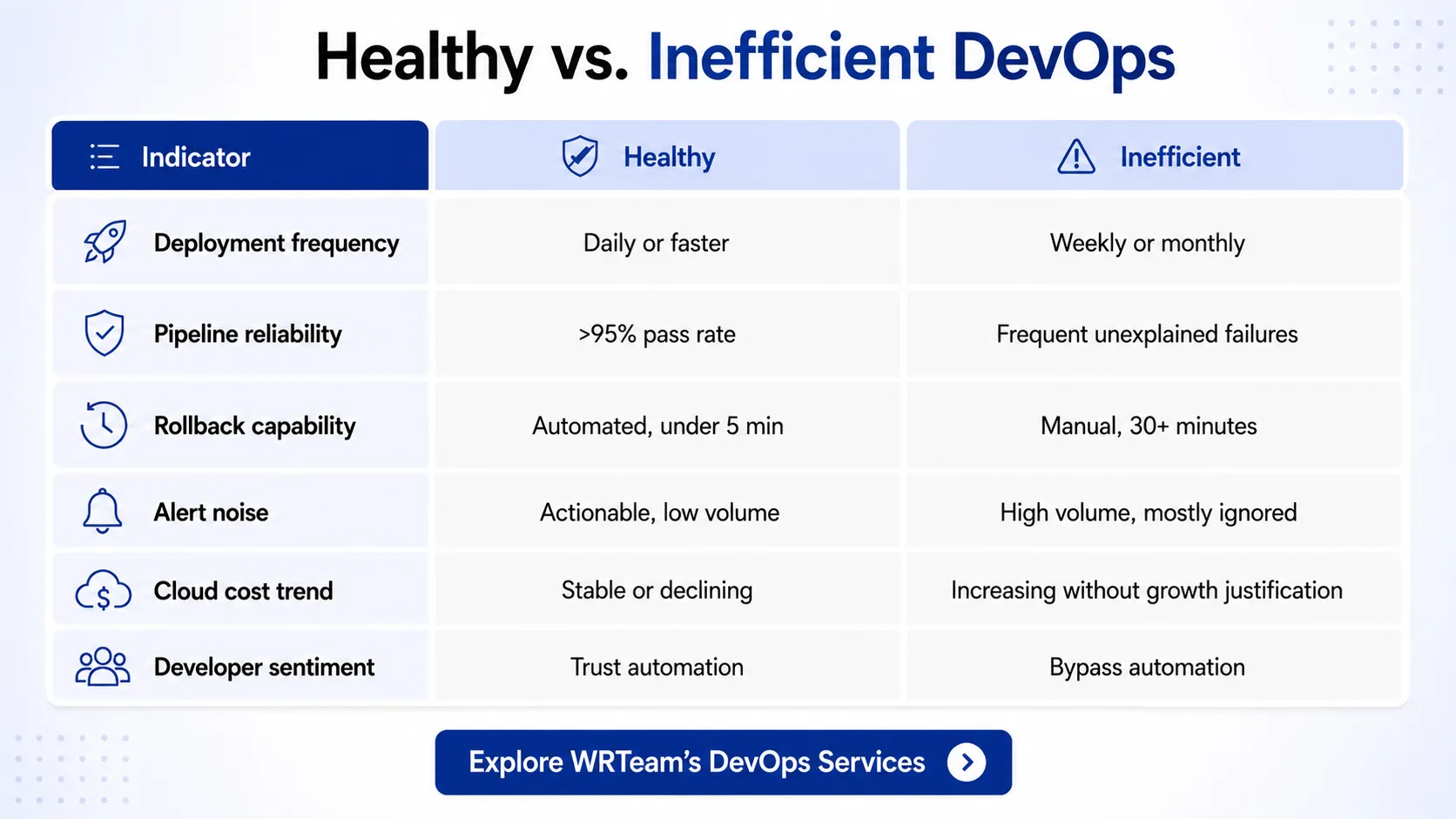
What a Healthy DevOps Setup Actually Looks Like
For reference, here are the operational benchmarks a well-optimized DevOps environment should hit:
|
Metric |
Healthy Benchmark |
|---|---|
|
Deployment frequency |
Multiple times per day (or per week minimum) |
|
Lead time for changes |
Under 1 hour |
|
Mean time to recovery (MTTR) |
Under 1 hour |
|
Change failure rate |
Under 5% |
|
Pipeline build time |
Under 10 minutes |
|
Cloud cost per deployment |
Tracked and stable |