Introduction: Why Design Decisions Make or Break Your Product
You have about 50 milliseconds to make a first impression online. That's the time it takes for a visitor to form an opinion about your website or app before they read a single word.
Design is not just about looking good. It shapes how people feel, navigate, and ultimately decide whether to stay or leave. Yet one of the most common points of confusion in product development is this: What exactly is the difference between UI design and UX design?
Many businesses use the terms interchangeably. Some think they're the same thing. Others assume one is more important than the other.
The reality? They're two distinct disciplines and you need both to build digital products that actually work.
This guide breaks down exactly what UI and UX design mean, how they differ, why they matter, and how they work together to create products people love.
What Is UI Design?
UI stands for User Interface design. It's everything a user sees and interacts with on a screen.
Think of UI design as the visual layer of a product: the colors, fonts, buttons, icons, spacing, and layout that you encounter on every screen.
What UI Designers Work On
Visual design - color palettes, typography, iconography
UX stands for User Experience design. It's the process of designing how a product feels to use not just how it looks.
UX design is rooted in empathy and research. A UX designer thinks about the user's journey from the moment they open an app to the moment they complete a goal. The focus is on usability, clarity, efficiency, and satisfaction.
What UX Designers Work On
User research - interviews, surveys, behavioral analysis to understand what users actually need
Information architecture - organizing content and features in a logical way
User flows - mapping out the steps a user takes to complete a task
Wireframing - low-fidelity sketches of screens showing structure without visuals
Prototyping - interactive mockups to test ideas before development
Usability testing - observing real users to identify friction and confusion
Accessibility - ensuring the product is usable by people with disabilities
Content strategy - making sure labels, microcopy, and instructions are clear
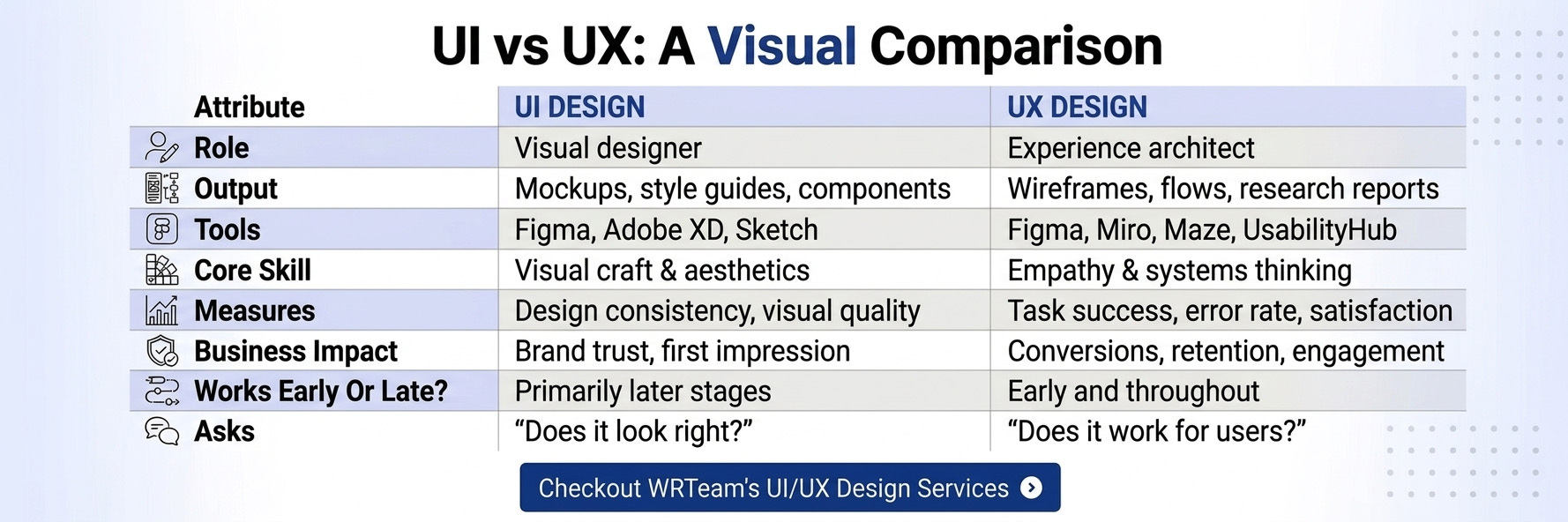
Here's a clean breakdown of how UI and UX design differ across every major dimension:
Dimension
UI Design
UX Design
Full Name
User Interface Design
User Experience Design
Focus
Visual presentation
User journey and behavior
Primary Goal
Aesthetic appeal and interaction
Usability and satisfaction
Key Activities
Visual design, component creation
Research, wireframing, testing
Deliverables
Style guides, high-fidelity mockups, prototypes
User flows, wireframes, research reports
Core Skills
Visual design, color theory, typography
Empathy, research, problem-solving
Tools
Figma, Adobe XD, Sketch
Figma, Miro, Maze, UsabilityHub
Measures Success By
Visual consistency, brand alignment
Task completion rate, error rate, satisfaction
Works With
Developers, brand teams
Product managers, developers, researchers
Analogy
The look of a building
The floor plan and how people move through it
The Simplest Way to Remember It
UX = the foundation, structure, and logic of the experience
UI = the paint, furniture, and decoration that makes it beautiful
A product with great UI but poor UX might look stunning but be confusing to use. A product with great UX but weak UI might work perfectly but feel outdated and untrustworthy.
You need both.
Real-World Examples
Good UI, Poor UX
Imagine a beautifully designed e-commerce app, gorgeous product photos, elegant fonts, perfect color palette. But the checkout process requires seven steps, hides the cart button, and doesn't save your shipping address. Users abandon it in frustration.
That's a great UI paired with poor UX.
Good UX, Average UI
Think of early versions of Craigslist or Reddit. Plain, text-heavy, not visually exciting but deeply functional. Users could find what they needed quickly. The information architecture and user flows were well thought out even when the visuals weren't polished.
That's good UX with average UI.
Where Both Work Together
Apps like Spotify, Airbnb, and Notion are widely cited as examples where UI and UX are tightly aligned. They're visually clean, but more importantly, they make complex tasks feel simple and intuitive. Users know where things are, what to do next, and rarely feel lost.
Why UI and UX Matter for Businesses
Good design isn't just aesthetic. It directly affects revenue, retention, and customer trust.
The Business Case for Design Investment
A study by Forrester Research (cited by multiple design agencies) found that a well-designed user interface could raise a website's conversion rate by up to 200%, while better UX design could yield conversion rates up to 400% higher.
According to Google's research on page experience, users are 24% less likely to abandon a page that meets Core Web Vitals thresholds directly tying UX performance to business outcomes. (Source: web.dev)
HubSpot notes that 88% of online consumers are less likely to return to a website after a bad experience. (Source: HubSpot)
Retention - Products that feel good to use get opened again. Frustrating ones get deleted.
Mobile engagement - With mobile devices accounting for over 60% of global web traffic, mobile-first UI/UX design is no longer optional.
Common UI/UX Mistakes to Avoid
Even experienced teams make these errors:
UI Mistakes
Cluttered layouts - Too many elements competing for attention; users don't know where to look
Inconsistent design systems - Different fonts, colors, and button styles across screens break trust
Poor color contrast - Text that's hard to read, especially on mobile or in sunlight
Overusing animations - Motion that distracts rather than guides
Ignoring responsive design - Interfaces that break on certain screen sizes
UX Mistakes
Skipping user research - Building based on assumptions instead of real user needs
No clear user flow - Users unsure of where to go next or how to complete a task
Weak accessibility - Forgetting users with visual, motor, or cognitive disabilities
Slow loading times - Google's research shows that as page load time increases from 1s to 5s, the probability of bounce increases by 90% (Source: Think with Google)
No feedback on actions - Forms with no confirmation, buttons with no loading state, errors with no explanation
UI and UX are not competing disciplines. They're partners. Here's how they interlock:
UX lays the foundation:
Defines what screens are needed
Maps out how users move between them
Establishes the hierarchy of information
Creates wireframes that show structure
UI brings it to life:
Takes the wireframe structure and applies visual design
Chooses colors that support the brand and guide attention
Selects typography that's readable and on-brand
Designs components that are both attractive and functional
Think of building a house: UX is the architect who plans the rooms, hallways, and layout. UI is the interior designer who makes every room beautiful and comfortable. Neither can succeed without the other.
A useful description from the Interaction Design Foundation: "UX design is not about the look but about the feel of the experience." (Source: interaction-design.org)
Modern UI/UX Trends in 2026–2027
Staying current matters for both designers and the businesses working with them.
Minimal interfaces - Clean, focused layouts that reduce cognitive load and help users act faster.
Accessibility-first design - Designing for WCAG compliance from the beginning, not as an afterthought. The Web Content Accessibility Guidelines are increasingly both a legal and ethical standard. (Source: web.dev)
Mobile-first design - Designing for the smallest screen first, then scaling up. Given mobile-dominant traffic globally, this is standard practice.
AI-assisted personalization - Interfaces that adapt to user behavior recommended content, personalized flows, smart defaults.
Motion design - Purposeful micro-animations that improve feedback, guide attention, and make products feel polished.
Design systems - Large-scale component libraries (like Google's Material Design) that ensure consistency across every product touchpoint. (Source: m3.material.io)
Whether you're building a web application, a Flutter mobile app, or redesigning an existing product, our team brings together UI craft and UX strategy to create experiences people actually enjoy.
UI and UX design are two sides of the same coin. Neither can replace the other, and the best digital products are the ones where both disciplines work in harmony.
To recap the core differences:
UI design is about visual presentation what users see
UX design is about the overall experience how a product works and feels
UI without UX can look beautiful but be confusing to use
UX without UI can function well but feel unpolished and untrustworthy
Both together create products that users trust, enjoy, and return to
Whether you're a founder planning your first product, a developer wanting to understand design better, or a business looking to improve digital performance, understanding these two disciplines is the first step toward building something that genuinely serves your users.
WRTeam specializes in UI/UX design, web development, Flutter app development, and end-to-end product design. We build digital experiences that are both beautiful and functional.
UI design focuses on the visual elements of a product's colors, typography, buttons, and layouts. UX design focuses on the overall experience of how usable, logical, and satisfying a product is to use. UI is what users see; UX is how they feel while using it.
✦RELATED BLOGS✦
Explore More Insights on Technology, Design & AI Trends