
Imagine hiring an architect who has already designed hundreds of homes. Instead of starting on a blank plot, they hand you the full blueprints of a house that's been tested, lived in, and proven to work. You change the paint, the layout, the fixtures and move in within weeks rather than years.
That's exactly what a Flutter source code template does for mobile app development. It's a complete, working codebase, screens, logic, APIs, databases, and all built with Google's Flutter framework and sold as a downloadable package ready for you to brand and ship.
Key takeaway: A Flutter source code template is a pre-built, production-ready app codebase that you buy once and customize cutting development time from months to days without sacrificing quality or ownership.
Why Flutter and why does it matter?
Flutter is Google's open-source UI toolkit that lets developers write a single codebase that runs natively on iOS, Android, web, and desktop. Since its stable release in 2018, it's become one of the most popular frameworks for cross-platform apps powering everything from fintech tools to social networks to e-commerce marketplaces.
The real advantage is one code, every platform. A Flutter template built for ride-sharing, for example, gives you a fully working app on iPhone and Android simultaneously without maintaining two separate codebases in Swift and Kotlin.
Flutter's widget system means templates look pixel-perfect on every device. Buyers aren't getting a watered-down adaptation, they're getting the real thing.
What exactly is inside a Flutter source code template?
A quality template isn't just screens and buttons. It's an entire application layer, the kind that would typically take a team of developers 3 to 6 months to build properly. Here's what a well-structured template includes:
UI screens and navigation - Onboarding, home, detail, profile, settings every screen designed and wired up with Flutter's navigation system.
Backend integration - Firebase, Supabase, or custom REST APIs already connected. Authentication, real-time data, and push notifications are ready to configure.
Payments and monetisation - Stripe, in-app purchases, or wallet integrations wired in. Subscriptions and one-time purchases are often included out of the box.
Maps and location - Google Maps, GPS tracking, geofencing common in delivery, ride-sharing, and service marketplace templates.
Chat and messaging - Real-time messaging via Firebase or Socket.io, often with image sharing, read receipts, and push notification support.
Admin panel - A web-based dashboard to manage users, listings, orders, or content usually built with Flutter Web or a separate React/Vue panel.
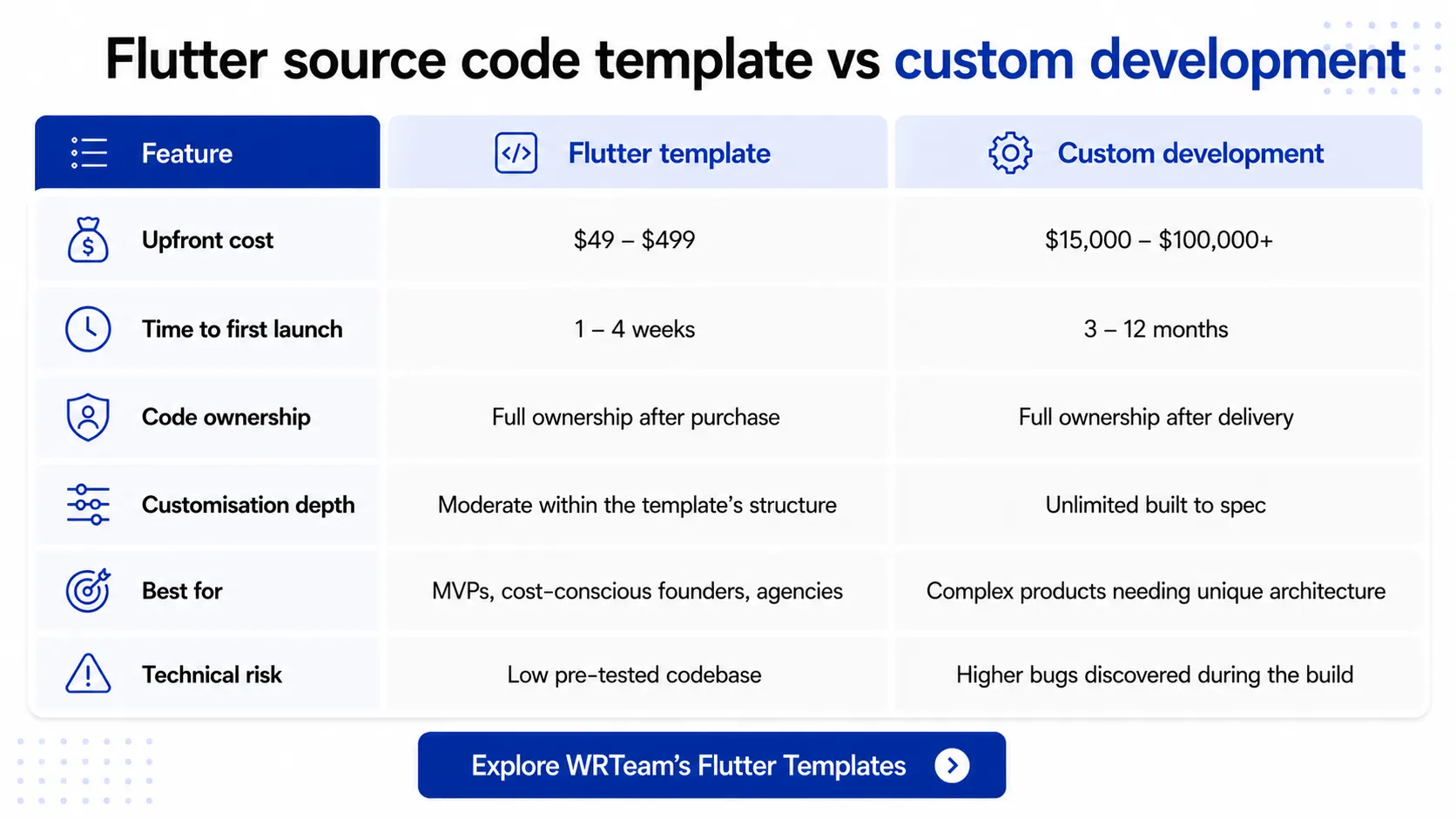
Flutter source code template vs custom development
The most common question buyers ask is: "Why not just build it from scratch?" The answer depends on your budget, timeline, and how differentiated your product needs to be. Here's an honest comparison:
Who actually buys Flutter templates?
The buyer profile is broader than most people expect. It's not just solo developers looking for shortcuts. Here are the four most common buyers:
First-time founders who want to validate a business idea with a working app before committing to a $50,000 build. A template lets them reach real users without burning through their savings.
Freelancers and small dev agencies who have a client needing a taxi app or marketplace but don't have the team or time to build it from the ground up in 6 weeks.
White-label resellers who buy once and resell under their brand or their client's brand multiple times. A single food delivery template can power dozens of local restaurant apps.
Corporate innovation teams who need a prototype or internal tool fast and don't want to wait months for IT to build something bespoke.
What categories exist?
The Flutter template market covers practically every app vertical. The most popular categories include:
-
E-commerce and marketplace apps (multi-vendor, single store, food delivery)
-
Ride-sharing and taxi booking (driver and passenger apps)
-
Social networking and community apps
-
On-demand service apps (handyman, beauty, home services)
-
Health and fitness tracking
-
Real estate and property listing
-
Education and e-learning platforms
-
News, blog, and content apps
How do you go from purchase to live app?
The launch process follows a predictable path regardless of which template category you buy:
-
Purchase and download - You receive the full source code as a ZIP or repository link. No subscriptions, no per-user fees.
-
Set up your backend - Configure Firebase or whichever backend the template uses. Most templates include step-by-step documentation for this.
-
Brand it - Replace the logo, update the colour palette, swap placeholder text with your content and copy.
-
Customise features - Add, remove, or modify features to match your business logic. Most buyers make modest changes at this stage for an MVP.
-
Test thoroughly - Run the app on real iOS and Android devices, fix edge cases, and QA each flow before submitting to app stores.
-
Submit to app stores - Publish to the Google Play Store and Apple App Store. Most templates include app store assets and guidance.
What to look for before you buy
Not all Flutter templates are equal. A poor template can cost you more time to fix than building from scratch. Here are the signals that separate a quality template from a risky one:
-
State management pattern - Look for GetX, Riverpod, or BLoC. Avoid templates with no clear architecture.
-
Flutter version - Should be on Flutter 3.x with null safety enabled.
-
Documentation quality - A proper setup guide and inline code comments are non-negotiable.
-
Demo app - Always test the live demo before buying. Screens should be smooth with no obvious bugs.
-
Support policy - Check how long post-purchase support lasts and what's included.
-
Licensing terms - Single-app vs multi-use licence affects agencies and white-labellers significantly.
Common questions
Do I need to know Flutter to use a template?
Some basic Dart/Flutter knowledge helps significantly, especially for customisation. If you're not technical, you'll want a developer but the template still saves them weeks of setup work.
Can I sell the app I build using a template?
Yes. Most templates include a licence that lets you sell or monetise the app you build. Check the specific licence terms: some restrict reselling the source code itself.
Will my app look different from others using the same template?
Yes, once you apply your branding, change the colour scheme, and customise the UX flow, the visual resemblance is minimal. Most buyers add at least one or two unique features on top.
Are Flutter templates suitable for production apps with real users?
Absolutely. Many apps on the Play Store and App Store started from templates. The key is choosing a well-maintained template and testing rigorously before launch.